weeDrumster

Another new project I started this month and actually one that made it to some sort of working state, which is not very common to me (don’t even remind me of ATTAG and that Kiln thing (horrible code). I know I have to get back to these one day but now this came to my mind and it had to be done. 😉

Download v0.6 for Windows here:

weeDrumster v0.6

The 3D-print files are here:

weeDrumster 3D printable files

What is weeDrumster?

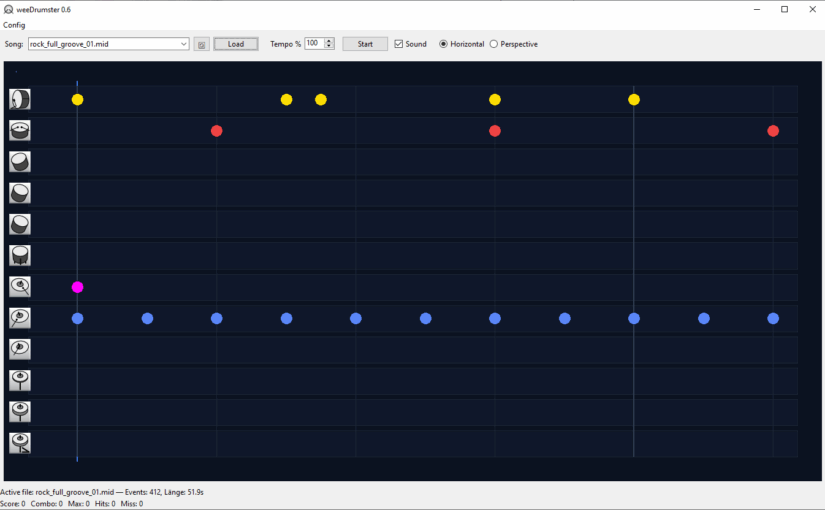
You probably can already guess from the screenshots. I wanted to create some sort of trainer for my vdrum digital Drumkit. Many probably know the concept from some games like Rockband, BandHero or Beatsaber, the notes scroll through the screen and you have to hit them at the right moment. The drumkit already comes with some similar thing as subscription service. (I forgot the name.) They put a lot of efford in it to create some training modes but the app used such a small area of the screen, that it was a pain to follow it and play the drums meanwhile.

weedDrumster simply connects via USB to the drumkit and reads your hits. You can load any mid file you want (put them into the /mid path), though many are badly edited or buggy, often the drum part isn’t set to channel 10, so they might sometimes sound weird or miss some of the drum parts. I tried to fix these problems but gave up and decided it is easier to pick some good midi files, the internet is full of those for free. If you don’t want to search for those, I also added a rather stupid midi pattern generator that spits out some random drum part patterns and stores them in the /mid path.

You can set various parameters, pre-roll, offset, play with sound or without, play all or just the drums or only all other instruments. You can mute a drum track by clicking on it in the horizontal mode or on the icon in perspective mode

The perspective mode.
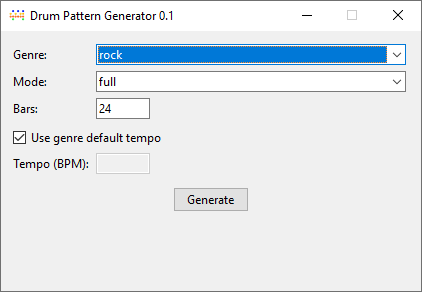
The pattern generator, pretty self-explanatory.

Now to the more crazy part, while getting the software done I thought it isn’t good enough to show the notes on the screen, why not showing them directly at the drums? So I remembered I had an unused Teensy 3.2 microcontroller somewhere waiting for some usage. I didn’t know much about it just that it was neat for building controllers that can be connected via. USB. To my surprise it was perfectly made for usage with midi, low latency, many I/O pins. Perfect.

The circuit itself is pretty straight forward, I just soldered a bunch of Dupont connectors to a circuit board and connected them to GND with one pin and along 220R resistors to some pins.

Pins 1,2,3,4,6,8,10,12. Due to space issues I left out those in between, but you can use any of these, just remember the 13 is also the internal LED of the Teensy 3.2.
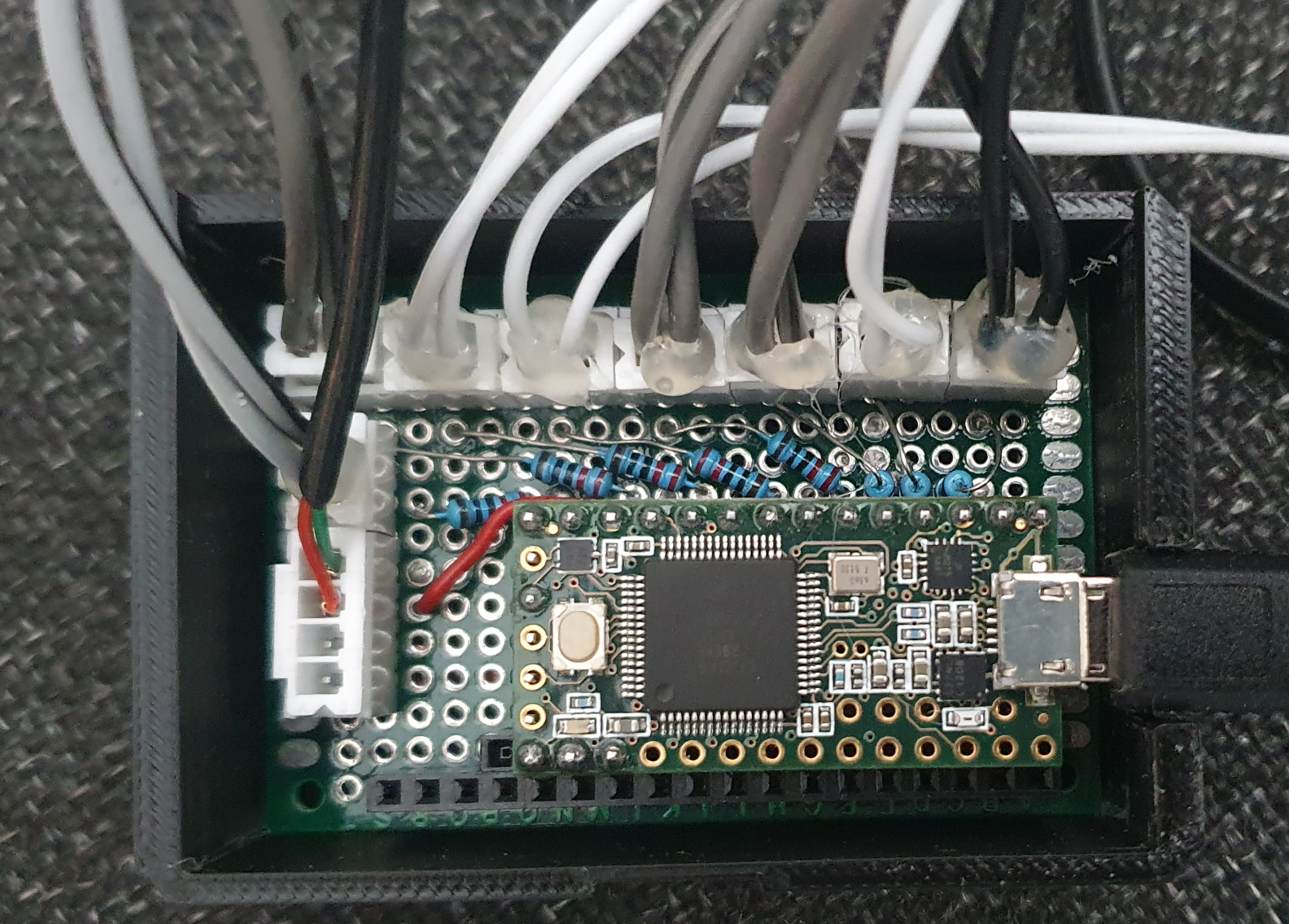
If you want to have more drums, want to split HiHat into open,closed,pedal or Ride into bell,rim,bow you need more LED of course and modify the code. I left those on one LED, because I thought it would get too chaotic anyway.

So circuit description for each LED:

LED (long leg) —> [220R] –> pin

LED (short leg) –> GND

Of course you can modify the resistor to the exact value matching your LED, I was too lazy and gave them all the same which works fairly okay with 220R

In addition I added a switch to pin 14 and connected it to a foot pedal. This one simulates space for start/stop so I don’t have to reach over to the notebok all the time to restart the song/pattern.
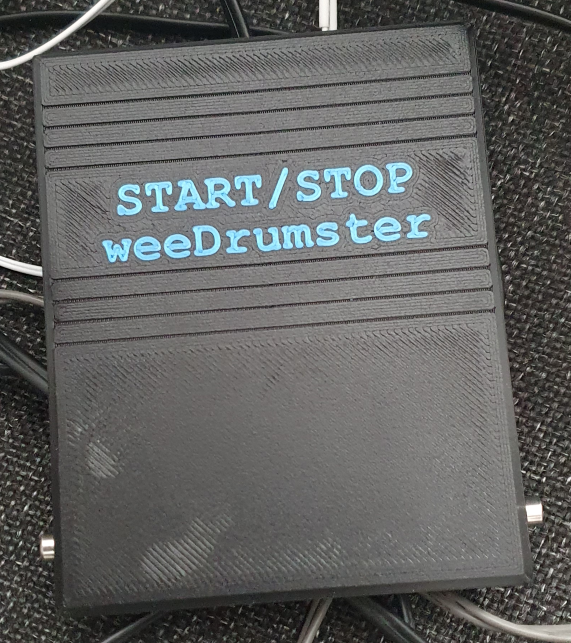
Circuit: GND–>switch–>Pin 14, no further magic here. I used a cheap microswitch and soldered it to an empty circuit board. Don’t know how long it will last, we will see. Of course you can also just buy a ready made foot pedal switch, there should be some.

// ------------------------------
// Teensy Drum-LED Trigger + Start/Stop-Button 
// ------------------------------

#include <Keyboard.h>  // for the foot pedal / space key similation

#include "usb_names.h"

// Check all midi modes so I can give the Teensy a decent name that appears in weeDrumster port selection (I don't know what the internal name for "all of the above" is) :
#if defined(USB_MIDI) || defined(USB_MIDI_SERIAL) || defined(USB_MIDI4_SERIAL) || defined(USB_MIDI_AUDIO_SERIAL) || defined(USB_MIDI_RAWHID) || defined(USB_MIDI_JOYSTICK) || defined(USB_MIDI_RAWHID_SERIAL) || defined(USB_MIDI_AUDIO) || defined(USB_KEYBOARDONLY_RAWHID_MIDI) || defined(USB_MIDI_SERIAL_HID) || defined(USB_ALLMINI) || defined(USB_EVERYTHING)

// port name:
#define PRODUCT_NAME   {'L','E','D','O','u','t'}
#define PRODUCT_NAME_LEN  6

#define MANUFACTURER_NAME {'T','h','e','p','i','x','e','l'}
#define MANUFACTURER_NAME_LEN 8

struct usb_string_descriptor_struct usb_string_product_name = {
  2 + PRODUCT_NAME_LEN * 2,
  3,
  PRODUCT_NAME
};

struct usb_string_descriptor_struct usb_string_manufacturer_name = {
  2 + MANUFACTURER_NAME_LEN * 2,
  3,
  MANUFACTURER_NAME
};

#endif

#define NOTE_KICK   36
#define NOTE_SNARE  38
#define NOTE_HH     42   // all HiHat-Variants  appear as 42, you can split those up and add more LED to your kit of course
#define NOTE_RIDE   51   // all Ride-Variants appear as 51, same here 
#define NOTE_CRASH  49
#define NOTE_TOM1   48
#define NOTE_TOM2   45
#define NOTE_TOM3   43

// LED Pins
#define LED_KICK   1
#define LED_SNARE  2
#define LED_HH     3
#define LED_CRASH  4
#define LED_RIDE   6
#define LED_TOM1   8
#define LED_TOM2   10
#define LED_TOM3   12

// Button-Pin
#define BUTTON_PIN 11                                                                                

// internal Teensy LED
#define LED_INTERNAL  13

// Full brightness
#define PULSE_BRIGHTNESS  255
#define DECAY_SPEED       5      

int ledLevel[8] = {0};
                         
// Button-handling
bool lastButtonState = HIGH;
unsigned long lastButtonChange = 0;
const unsigned long debounceMs = 25;

// Internal LED blink
bool blinkState = false;
unsigned long lastBlink = 0;
const unsigned long blinkInterval = 120;  //blink speed

void setup() {
  // LED Pins
  pinMode(LED_KICK,  OUTPUT);
  pinMode(LED_SNARE, OUTPUT);
  pinMode(LED_HH,    OUTPUT);
  pinMode(LED_CRASH, OUTPUT);
  pinMode(LED_RIDE,  OUTPUT);
  pinMode(LED_TOM1,  OUTPUT);
  pinMode(LED_TOM2,  OUTPUT);
  pinMode(LED_TOM3,  OUTPUT);

  // internal LED
  pinMode(LED_INTERNAL, OUTPUT);
  digitalWrite(LED_INTERNAL, LOW);

  // Button
  pinMode(BUTTON_PIN, INPUT_PULLUP);

  // prepare "Keyboard"
  Keyboard.begin();
}

void loop() {

  // read MIDI
  while (usbMIDI.read()) {
    if (usbMIDI.getType() == usbMIDI.NoteOn &&
        usbMIDI.getData2() > 0) {

      triggerLed(usbMIDI.getData1());
    }
  }

  // LEDs soft off
  for (int i = 0; i < 8; i++) {
    if (ledLevel[i] > 0) {
      ledLevel[i] -= DECAY_SPEED;
      if (ledLevel[i] < 0) ledLevel[i] = 0;
    }
  }

  // write LEDs 
  analogWrite(LED_KICK,  ledLevel[0]);
  analogWrite(LED_SNARE, ledLevel[1]);
  analogWrite(LED_HH,    ledLevel[2]);
  analogWrite(LED_CRASH, ledLevel[3]);
  analogWrite(LED_RIDE,  ledLevel[4]);
  analogWrite(LED_TOM1,  ledLevel[5]);
  analogWrite(LED_TOM2,  ledLevel[6]);
  analogWrite(LED_TOM3,  ledLevel[7]);

  // watch button
  handleButton();

  delay(4);
}

void triggerLed(int note) {
if (note == NOTE_KICK)        ledLevel[0] = PULSE_BRIGHTNESS;
else if (note == NOTE_SNARE)  ledLevel[1] = PULSE_BRIGHTNESS;
else if (note == NOTE_HH)     ledLevel[2] = PULSE_BRIGHTNESS;
else if (note == NOTE_CRASH)  ledLevel[3] = PULSE_BRIGHTNESS;
else if (note == NOTE_RIDE)   ledLevel[4] = PULSE_BRIGHTNESS;
else if (note == NOTE_TOM1)   ledLevel[5] = PULSE_BRIGHTNESS;
else if (note == NOTE_TOM2)   ledLevel[6] = PULSE_BRIGHTNESS;
else if (note == NOTE_TOM3)   ledLevel[7] = PULSE_BRIGHTNESS;

}

void handleButton() {
  int state = digitalRead(BUTTON_PIN);
  unsigned long now = millis();

  // make sure your button isn't nervous ;-) 
  if (state != lastButtonState && (now - lastButtonChange) > debounceMs) {
    lastButtonChange = now;
    lastButtonState = state;

    if (state == LOW) {
      sendSpaceKey();
    }
  }

  // flash internal LED when button pressed
  if (state == LOW) {
    if (now - lastBlink > blinkInterval) {
      lastBlink = now;
      blinkState = !blinkState;
      digitalWrite(LED_INTERNAL, blinkState ? HIGH : LOW);
    }
  } else {
    // internal LED of when button released
    digitalWrite(LED_INTERNAL, LOW);
  }
}

void sendSpaceKey() {
  Keyboard.press(' ');
  delay(10);
  Keyboard.release(' ');
}
Make sure your Teensyduino IDE USB Type is set to "All of the above" because there is no keyboard+midi preset.

That is what it looks like, well sort of. Not many of the LED are visible but you get the idea. Some ring-lights around the snare and tom would be a cool thing. If you have an idea that doesn’t need an external psu, let me know.

That’s it, let me know what you think.
Genealogie Web App RootSoup

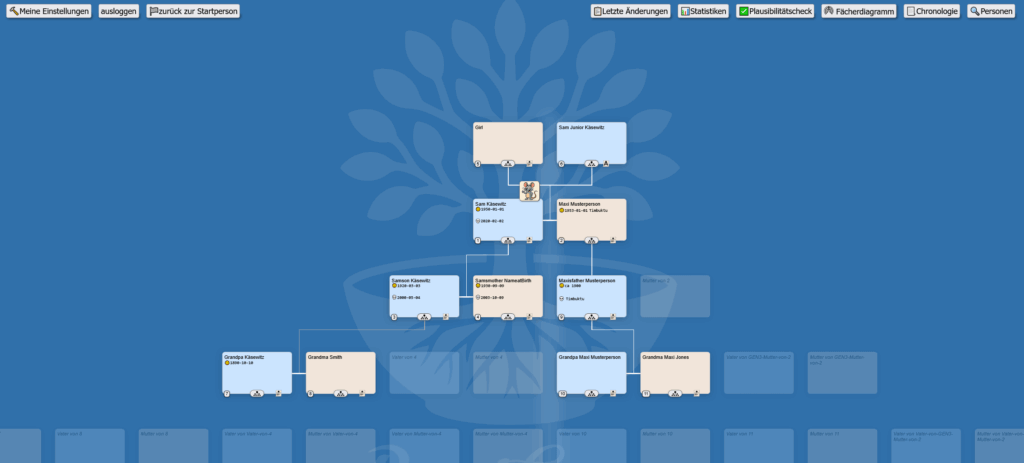
Vor einer Weile habe ich einmal eine Genalogie App fürs Web gebastelt. Es gibt so einige Programme und Webscripte, aber die haben mir alle nicht wirklich zugesagt. Falls jemand Interesse hat, kann man mich unter

frickel[at]thepixel.net

erreichen. Für private Anwendungen gedenke ich das ganze Paket irgendwann einmal kostenfrei zu veröffentlichen. Einen Gastzugang / Demo gibt es hier mit gast/gast, die Schreibrechte sind allerdings deaktiviert:

Pogopins difference

I ordered a batch of new pogopin connectors at the same supplier where I bought the first batch, sadly I noticed the new batch is slightly different size and swapped magnet orientation. So if you get those connectors for your ammo clips and blasters, get enough in ONE batch. I’ll add a modified version of the printable files soon.

ATTAG FRAMmo

Yes it has been a while since my last post however here is the first package with all the required data for the ammo clips.

ATTAG Frammo V1.3

First I started with blue clips and quickly found out that the light of the LED almost can’t pass the material. So I have picked yellow, also because it is easier to find in case you drop it when you are in a match. And I tried it with flying wires. Of course you can do it, but I can not recommend it because at the end the PCB aren’t really expensive at all and the money you invest in them you save on the wires you don’t require then.

So I opened fritzing and created a PCB (layout and link in the above file) and ordered a stack of them. Please don’t mind the circuit view in fritzing the soldering is pretty self-explaining in the pictures you see here.

Use the small display lift as you see in this picture:

Print as many of the cases as you need:

Solder like this:

Basically just GND,VCC,SC and SDA and the resistor for the LED. Soldering the pogopin connector is a bit tricky because the magnets attract the tip of the soldering iron but it is doable. Positive pin of the LED to the lower connection to the edge.

There you go, your stack of FRAMmo

By the way, all of this isn’t really required to make ATTAG work at the end, it is a nice addon and SOME game modes will require them. However, a cheaper way is to just leave the display out of them. The ammo left will be shown on the blaster display anyway. This here is just a fancy addon. I’ll add a case version without display window at a later point.

Last but not least, if you mess up your electronics or health by trusting in my work – your problem. No warranties given.

ATTAG ESP-NOW handshake working

Just a small update, the handshake by ESP-NOW is working, I haven’t tested the range yet but this is not an issue which stops the PCB from being created, because the WiFi stuff is on the ESP MCU anyway.

I have chosen to overwrite the MAC addresses of the blasters with 0x00 to 0x0F (0-15). This isn’t really required and I already had multiple people complaining about this: “They already have unique addresses.” But in my eyes it makes things easier to handle. Take it or leave it, anybody can change my lousy code once it is released. 😉

I still have some headaches with audio, the ferrit beads don’t change anything except from consuming a lot of space, completely useless because without any effect. Not to mention that it is a real pia to get sound working on the server parallel to the lvgl graphics stuff. It is possible by moving the elements to seperate tasks but it still isn’t really good. The server doesn’t need to play any fancy sounds, just some beeps but that seems to be more difficult than playing a wav. Wav playing works but the DAC output is way lower than pushing a simple tone() to that pin, and the start game / end game signals need to be loud enough to hear them in 100m distance. Of course the blasters could signal too but that might end in a multiple sound chaos due to delays in start command receiption. Anyway, I am on it.

ATTAG audio and wifi update

Now I spent like two weeks on the I2S audio stuff and I still can’t get it to work, I know it is sort of functional on the physical basis so it is okay how it is connected to the PCB but I think I’ll just put that aside for a moment because I am just too dumb for the code.

That just stops me from further progress and at least I got some audio working with the DAC path. I’ll just get back to I2S once I am done with the rest. The DAC stuff is far from ideal, especially about the noise and every electronical way to get rid of interference just didn’t turn out what I expected. I am still waiting for some ferrit beads to add, the capacitors mentioned in the PAM specs actually don’t make much difference.

For the WiFi communication it is a comparable situation, the LR mode simply doesn’t work and I don’t wanna wait until someone drops an eye on it at espressif. So I’ll do a step back and try ESP-NOW which should be able to achieve ranges around 200m outdoor and maybe even 50m indoor. I just hope this works better with the current espressif package than LR.

Meanwhile I ported the blaster code to platformio just as the server code. So at the end noone has to switch between Arduino IDE and Platformio. I’ll get more into detail how to use the code, once this is at release level. It will contain heavy inline documentation for almost every line of code, so even nobrainer like me can get it to work. 😉

ATTAG – multiple IR receivers #2

I was testing the IR receiption using the IRMP lib with the D32 board now and it turns out it got the same issues like the S3, but at least it works in single core mode. However as soon as you try to put the IR listening to the second core, the D32 ends in a boot loop.

There probably is a way to fix this but meanwhile I put focus on the secondary microcontrollers für IR receiption. In the last post I attached a picture with a set of possible candidates. I suggest to drop those without TX/RX capabilities which are the ATTINY variants and go for one of the ESPs. The ESP-01 is the cheapest variant and got all required I/O to get the job done. Any other ESP8266 or ESP32 will do too but are actually an overkill for the small task.

Why TX/RX? It is the simplest way to send the information to the main board, for an ATTAG 2.0 version those could even communicate via wifi, so a hit receiver on a helmet or backpack wouldn’t require a cable. But that is nothing for the first release version. My lasertag experiences tell me additional hitpoints are not really important. As long as all players play fair, not covering the IR receiver.

Since it also needs to provide information who actually shot just an 0 or 1 isn’t enough. That is where the TX/RX comes in handy. All receivers will be connected to RX of the main board then, giving the opportunity of a flexible number of detectors.

Here the cleaned up breadboard with one working IR receiver ESP-01 connected to RX of the D32 board. Two things left to test, then I’ll get some PCB for a “release candidate”. First thing to test is the shutdown/wakeup of the PAM audio board. The static noises are just annoying so it makes sense to activate the amp only when it is required. I am not sure if the switiching will be fast enough though. Up to now I could just switch it off but not reenable it. Other way of course using some capacitors. Second, the IR sender. I had some working circuit already but it was a bit overkill and required two more diodes, the TIP120 is too big so I’ll go a step down to a smaller transistor.

much cleaner now… 🙂

ATTAG – some fun today

… wait, where does the white wire belong? 😉

Even though this works until now, I really need to put this on a double size breadbord and use short connecting wires.

However with this chaotic wiring I already checked the following:

  • I²C Display – working
  • I²C FRAM – working
  • ID Pot – working
  • Multi-Core with digitalread – working
  • DAC sound with PAM amplifier – working
  • WLED lights – working

ATTAG – how to for multiple IR receivers

The IR detection got one problem which needs to be solved, the IR libraries are only able to receive at one pin. Which means technically it would be possible to hardwire multiple reveivers but then there is risk of mixing valid and unvalid signals and it is never possible to detemine where you have been hit.

So I am going to try to get the source done to read from one pin directly connected to the mainboard plus an optional feature to read from other hitpoin pins.

This however requires the receivers to run on their own circuit.

For this you will be able to choose from a large variety of boards that can be programmed with Arduino IDE. Basically the one the right here ATTINY85 (with the chip missing) will most likely do. Others need a programmer, such as the second in the row. So it will be up to you what to choose, I’ll test this with multiple of these little friends, the ESP32 variations will be a total overkill though.