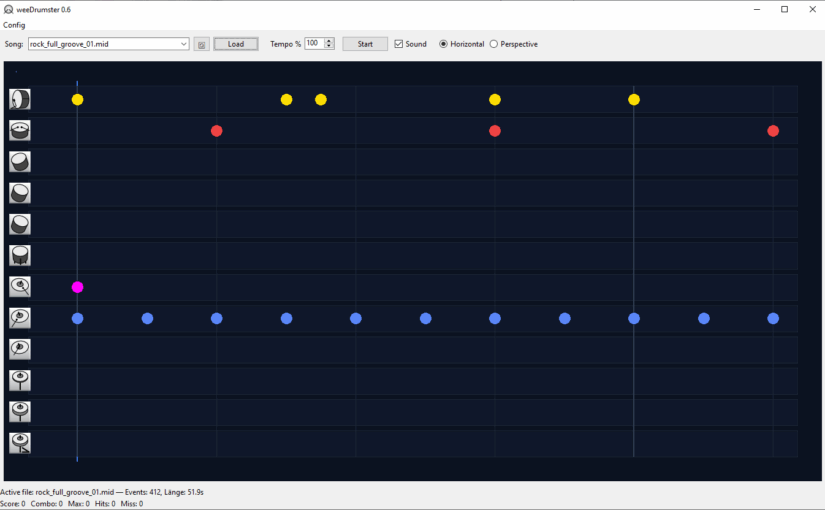
Another new project I started this month and actually one that made it to some sort of working state, which is not very common to me (don’t even remind me of ATTAG and that Kiln thing (horrible code). I know I have to get back to these one day but now this came to my mind and it had to be done. 😉
Download v0.6 for Windows here:
The 3D-print files are here:
weeDrumster 3D printable files
What is weeDrumster?
You probably can already guess from the screenshots. I wanted to create some sort of trainer for my vdrum digital Drumkit. Many probably know the concept from some games like Rockband, BandHero or Beatsaber, the notes scroll through the screen and you have to hit them at the right moment. The drumkit already comes with some similar thing as subscription service. (I forgot the name.) They put a lot of efford in it to create some training modes but the app used such a small area of the screen, that it was a pain to follow it and play the drums meanwhile.
weedDrumster simply connects via USB to the drumkit and reads your hits. You can load any mid file you want (put them into the /mid path), though many are badly edited or buggy, often the drum part isn’t set to channel 10, so they might sometimes sound weird or miss some of the drum parts. I tried to fix these problems but gave up and decided it is easier to pick some good midi files, the internet is full of those for free. If you don’t want to search for those, I also added a rather stupid midi pattern generator that spits out some random drum part patterns and stores them in the /mid path.
You can set various parameters, pre-roll, offset, play with sound or without, play all or just the drums or only all other instruments. You can mute a drum track by clicking on it in the horizontal mode or on the icon in perspective mode

The perspective mode.
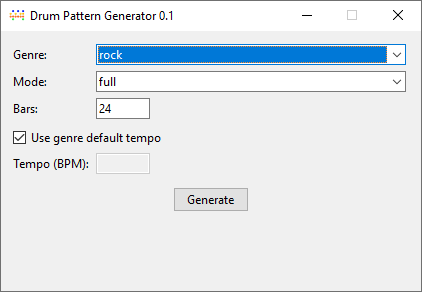
The pattern generator, pretty self-explanatory.
Now to the more crazy part, while getting the software done I thought it isn’t good enough to show the notes on the screen, why not showing them directly at the drums? So I remembered I had an unused Teensy 3.2 microcontroller somewhere waiting for some usage. I didn’t know much about it just that it was neat for building controllers that can be connected via. USB. To my surprise it was perfectly made for usage with midi, low latency, many I/O pins. Perfect.
The circuit itself is pretty straight forward, I just soldered a bunch of Dupont connectors to a circuit board and connected them to GND with one pin and along 220R resistors to some pins.
Pins 1,2,3,4,6,8,10,12. Due to space issues I left out those in between, but you can use any of these, just remember the 13 is also the internal LED of the Teensy 3.2.
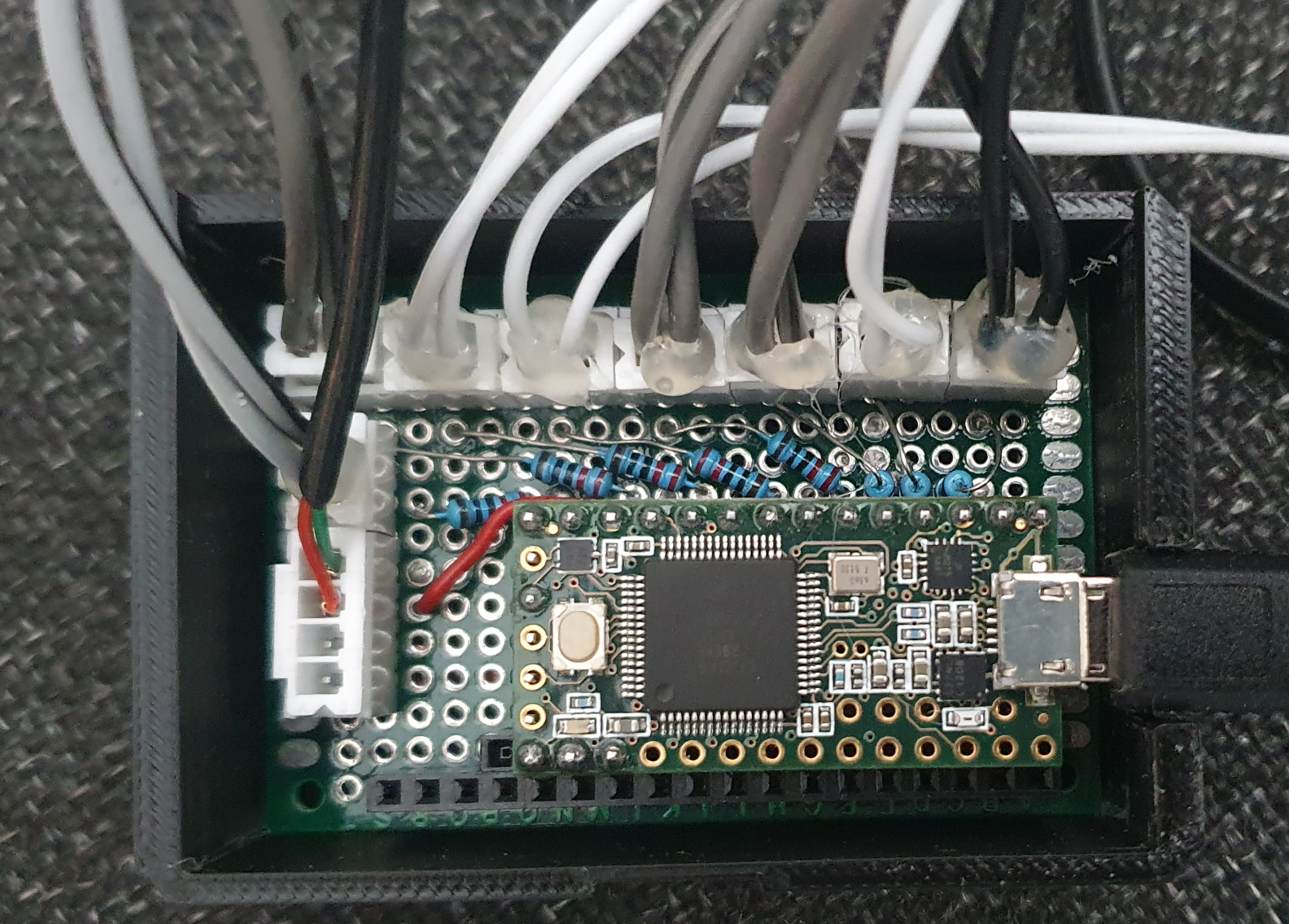
If you want to have more drums, want to split HiHat into open,closed,pedal or Ride into bell,rim,bow you need more LED of course and modify the code. I left those on one LED, because I thought it would get too chaotic anyway.
So circuit description for each LED:
LED (long leg) —> [220R] –> pin
LED (short leg) –> GND
Of course you can modify the resistor to the exact value matching your LED, I was too lazy and gave them all the same which works fairly okay with 220R
In addition I added a switch to pin 14 and connected it to a foot pedal. This one simulates space for start/stop so I don’t have to reach over to the notebok all the time to restart the song/pattern.
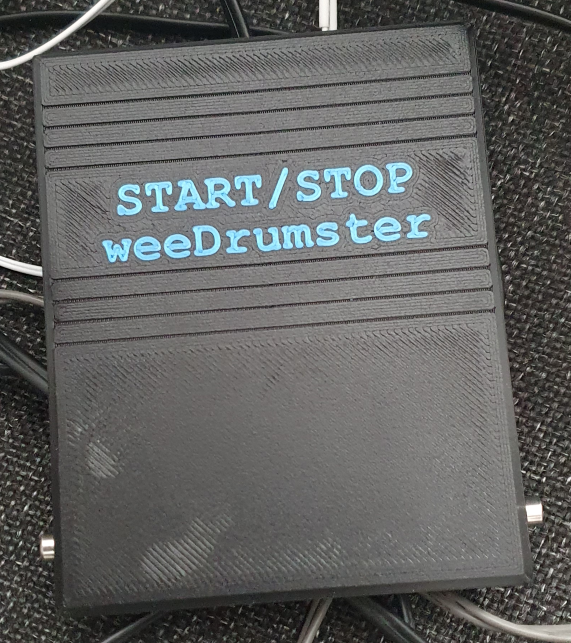
Circuit: GND–>switch–>Pin 14, no further magic here. I used a cheap microswitch and soldered it to an empty circuit board. Don’t know how long it will last, we will see. Of course you can also just buy a ready made foot pedal switch, there should be some.
// ------------------------------
// Teensy Drum-LED Trigger + Start/Stop-Button
// ------------------------------

#include <Keyboard.h>  // for the foot pedal / space key similation

#include "usb_names.h"

// Check all midi modes so I can give the Teensy a decent name that appears in weeDrumster port selection (I don't know what the internal name for "all of the above" is) :
#if defined(USB_MIDI) || defined(USB_MIDI_SERIAL) || defined(USB_MIDI4_SERIAL) || defined(USB_MIDI_AUDIO_SERIAL) || defined(USB_MIDI_RAWHID) || defined(USB_MIDI_JOYSTICK) || defined(USB_MIDI_RAWHID_SERIAL) || defined(USB_MIDI_AUDIO) || defined(USB_KEYBOARDONLY_RAWHID_MIDI) || defined(USB_MIDI_SERIAL_HID) || defined(USB_ALLMINI) || defined(USB_EVERYTHING)

// port name:
#define PRODUCT_NAME   {'L','E','D','O','u','t'}
#define PRODUCT_NAME_LEN  6

#define MANUFACTURER_NAME {'T','h','e','p','i','x','e','l'}
#define MANUFACTURER_NAME_LEN 8

struct usb_string_descriptor_struct usb_string_product_name = {
  2 + PRODUCT_NAME_LEN * 2,
  3,
  PRODUCT_NAME
};

struct usb_string_descriptor_struct usb_string_manufacturer_name = {
  2 + MANUFACTURER_NAME_LEN * 2,
  3,
  MANUFACTURER_NAME
};

#endif

#define NOTE_KICK   36
#define NOTE_SNARE  38
#define NOTE_HH     42   // all HiHat-Variants  appear as 42, you can split those up and add more LED to your kit of course
#define NOTE_RIDE   51   // all Ride-Variants appear as 51, same here
#define NOTE_CRASH  49
#define NOTE_TOM1   48
#define NOTE_TOM2   45
#define NOTE_TOM3   43

// LED Pins
#define LED_KICK   1
#define LED_SNARE  2
#define LED_HH     3
#define LED_CRASH  4
#define LED_RIDE   6
#define LED_TOM1   8
#define LED_TOM2   10
#define LED_TOM3   12

// Button-Pin
#define BUTTON_PIN 11

// internal Teensy LED
#define LED_INTERNAL  13

// Full brightness
#define PULSE_BRIGHTNESS  255
#define DECAY_SPEED       5

int ledLevel[8] = {0};

// Button-handling
bool lastButtonState = HIGH;
unsigned long lastButtonChange = 0;
const unsigned long debounceMs = 25;

// Internal LED blink
bool blinkState = false;
unsigned long lastBlink = 0;
const unsigned long blinkInterval = 120;  //blink speed

void setup() {
  // LED Pins
  pinMode(LED_KICK,  OUTPUT);
  pinMode(LED_SNARE, OUTPUT);
  pinMode(LED_HH,    OUTPUT);
  pinMode(LED_CRASH, OUTPUT);
  pinMode(LED_RIDE,  OUTPUT);
  pinMode(LED_TOM1,  OUTPUT);
  pinMode(LED_TOM2,  OUTPUT);
  pinMode(LED_TOM3,  OUTPUT);

  // internal LED
  pinMode(LED_INTERNAL, OUTPUT);
  digitalWrite(LED_INTERNAL, LOW);

  // Button
  pinMode(BUTTON_PIN, INPUT_PULLUP);

  // prepare "Keyboard"
  Keyboard.begin();
}

void loop() {

  // read MIDI
  while (usbMIDI.read()) {
    if (usbMIDI.getType() == usbMIDI.NoteOn &&
        usbMIDI.getData2() > 0) {

      triggerLed(usbMIDI.getData1());
    }
  }

  // LEDs soft off
  for (int i = 0; i < 8; i++) {
    if (ledLevel[i] > 0) {
      ledLevel[i] -= DECAY_SPEED;
      if (ledLevel[i] < 0) ledLevel[i] = 0;
    }
  }

  // write LEDs
  analogWrite(LED_KICK,  ledLevel[0]);
  analogWrite(LED_SNARE, ledLevel[1]);
  analogWrite(LED_HH,    ledLevel[2]);
  analogWrite(LED_CRASH, ledLevel[3]);
  analogWrite(LED_RIDE,  ledLevel[4]);
  analogWrite(LED_TOM1,  ledLevel[5]);
  analogWrite(LED_TOM2,  ledLevel[6]);
  analogWrite(LED_TOM3,  ledLevel[7]);

  // watch button
  handleButton();

  delay(4);
}

void triggerLed(int note) {
if (note == NOTE_KICK)        ledLevel[0] = PULSE_BRIGHTNESS;
else if (note == NOTE_SNARE)  ledLevel[1] = PULSE_BRIGHTNESS;
else if (note == NOTE_HH)     ledLevel[2] = PULSE_BRIGHTNESS;
else if (note == NOTE_CRASH)  ledLevel[3] = PULSE_BRIGHTNESS;
else if (note == NOTE_RIDE)   ledLevel[4] = PULSE_BRIGHTNESS;
else if (note == NOTE_TOM1)   ledLevel[5] = PULSE_BRIGHTNESS;
else if (note == NOTE_TOM2)   ledLevel[6] = PULSE_BRIGHTNESS;
else if (note == NOTE_TOM3)   ledLevel[7] = PULSE_BRIGHTNESS;

}

void handleButton() {
  int state = digitalRead(BUTTON_PIN);
  unsigned long now = millis();

  // make sure your button isn't nervous ;-)
  if (state != lastButtonState && (now - lastButtonChange) > debounceMs) {
    lastButtonChange = now;
    lastButtonState = state;

    if (state == LOW) {
      sendSpaceKey();
    }
  }

  // flash internal LED when button pressed
  if (state == LOW) {
    if (now - lastBlink > blinkInterval) {
      lastBlink = now;
      blinkState = !blinkState;
      digitalWrite(LED_INTERNAL, blinkState ? HIGH : LOW);
    }
  } else {
    // internal LED of when button released
    digitalWrite(LED_INTERNAL, LOW);
  }
}

void sendSpaceKey() {
  Keyboard.press(' ');
  delay(10);
  Keyboard.release(' ');
}
Make sure your Teensyduino IDE USB Type is set to "All of the above" because there is no keyboard+midi preset.That is what it looks like, well sort of. Not many of the LED are visible but you get the idea. Some ring-lights around the snare and tom would be a cool thing. If you have an idea that doesn’t need an external psu, let me know.
That’s it, let me know what you think.